Draft KYC reviews with AI, with customer details masked
For compliance analysts and financial-crime teams at banks. This page shows two tasks on customer files: what you see on your Mac, and what your AI model provider receives.
The rules that stop bank staff putting customer files into Claude or ChatGPT
A customer file sent to an AI company as written gives that company the customer’s name, passport number and account activity. These are the rules that usually stand in the way:
Your bank’s own policies
The bank’s AI policy, and its outsourcing and third-party risk policy: a new company that receives customer data has to be assessed and approved first.
Customer confidentiality and data protection
In the US, the Gramm-Leach-Bliley Act limits sharing customers’ non-public personal information. In the UK, the bank’s duty of confidentiality to its customer and the UK GDPR apply, and the FCA expects outsourcing to be controlled.
Suspicious activity reports
A SAR and the fact that one was filed are confidential by law.
The decision belongs to your bank’s compliance and information security teams, not to the analyst. What DoeDesk gives them to assess: the source code, a list of what goes where, and the option to run the detection service inside the bank. This page is not legal advice.
Two tasks on customer files, as you see them and as your AI model provider receives them
1Draft a periodic KYC review
You tell the agent
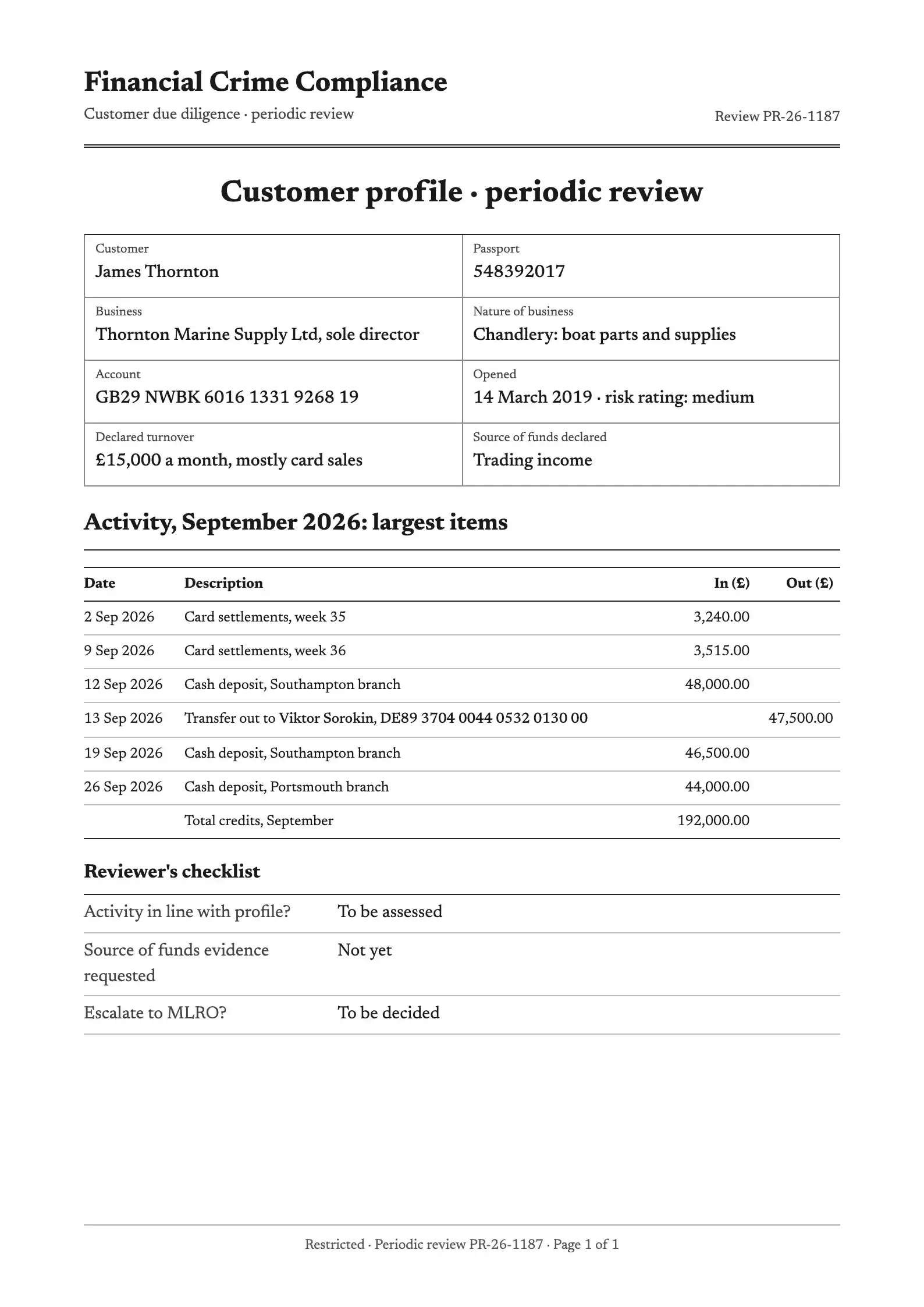
This is the customer's onboarding file and six months of statements. Draft the periodic KYC review: source of funds, activity against the declared profile, and anything to escalate.
customer-profile.pdfPages: 11 / 1
Your AI model provider receives these pages as text with stand-ins, not as a PDF file. They are drawn as pages here so you can compare.
replaced with a stand-inleft as written
What comes back to you
A draft review on your Mac that sets the £192,000 of September credits against the declared £15,000 a month and lists the pass-through transfer, with the real names and account numbers, ready for you to check and sign.
What DoeDesk replaced
The customer’s name and passport number
The business’s name
Both IBANs
The name of the person who received the transfer
What DoeDesk left as written, and why
Every amount and date: the review is about them
The pattern itself. A £48,000 cash deposit followed by a £47,500 transfer the next day can identify a customer to someone who already knows the account
2Draft the narrative for a suspicious activity report
You tell the agent
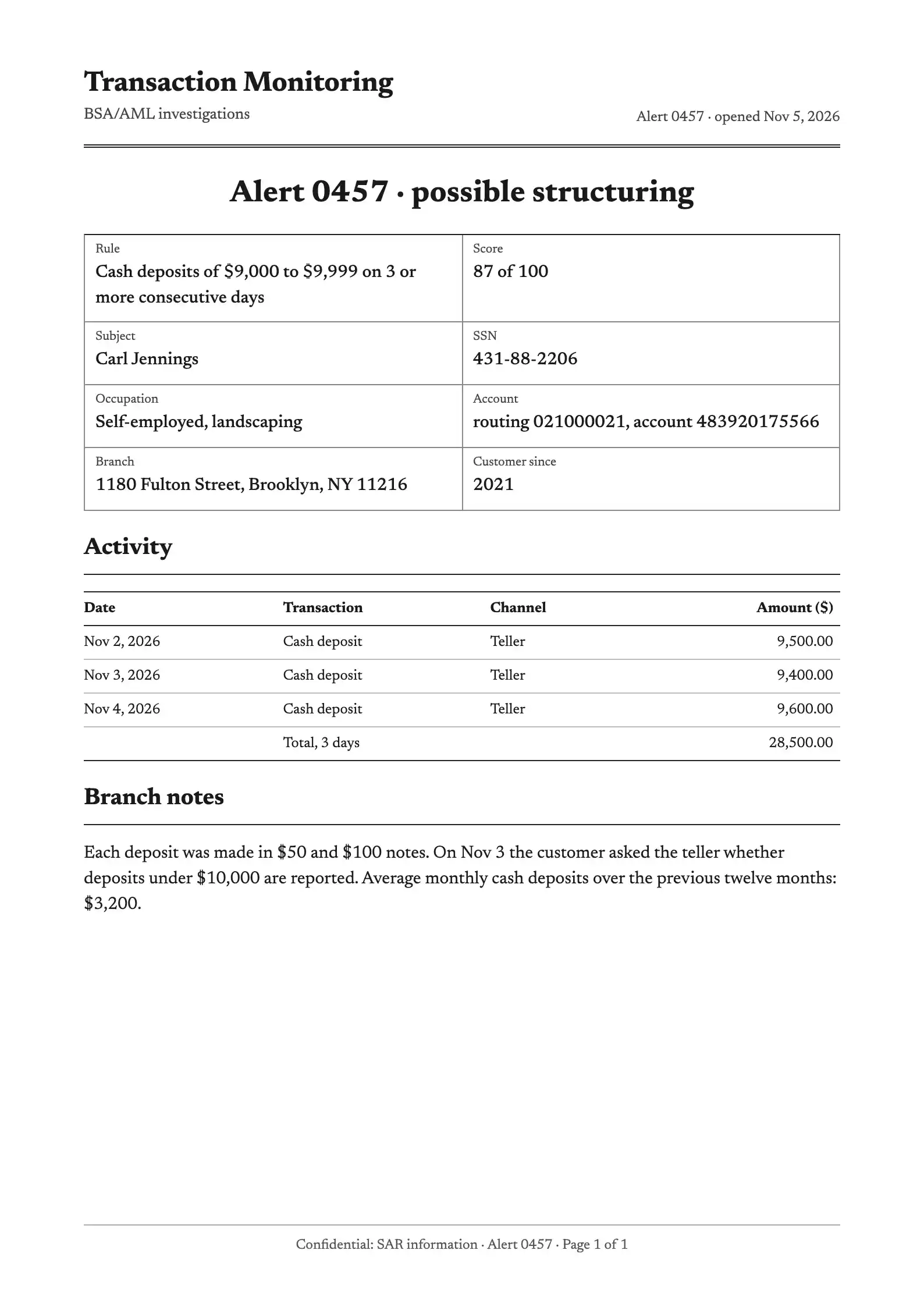
Read the alert file and the branch notes. Draft the SAR narrative: who, what, when, where and why it is suspicious, in date order.
alert-0457.pdfPages: 11 / 1
Your AI model provider receives these pages as text with stand-ins, not as a PDF file. They are drawn as pages here so you can compare.
replaced with a stand-inleft as written
What comes back to you
A draft narrative on your Mac, in date order, with Carl Jennings’s real name, Social Security number and account number, for the reporting officer to review.
What DoeDesk replaced
The subject’s name and Social Security number
The routing number
The account number. DoeDesk’s detection service labelled it a phone number; a wrong label does not change what is replaced or what is restored
The branch address
What DoeDesk left as written, and why
The three deposits and their dates: they are the suspicion
The alert number
Questions bank compliance teams ask about DoeDesk
May bank staff run customer files through an AI model?
Only if the bank has approved it. Customer confidentiality, data protection law and the bank’s outsourcing policy all apply, and SAR material has its own secrecy rule. DoeDesk does not make that decision for the bank; it changes what the AI company receives and lets the bank’s teams read exactly how.
Where does each piece of text go, and can all of it stay inside the bank?
By default the text of a file goes to two places: as written, to DoeDesk’s detection service (on DoeDesk’s servers in Jeddah, Saudi Arabia) to find names, organisations and addresses; and with stand-ins to the AI company. If the bank runs its own detection service, the text as written goes only to the bank’s server. That takes one server that answers POST /v1/detect and, to read scans, POST /v1/ocr, with name-detection and text-reading software the bank chooses. The text with stand-ins still goes to the AI company. A scanned page goes to the AI company as its text with stand-ins, or, if you choose “Redacted image” in DoeDesk’s Settings, as the image with a labelled black box over each detected value.
What about amounts and transaction patterns?
DoeDesk sends them as written. Amounts and dates are not identifiers on their own, and the review cannot be written without them. A distinctive pattern can still identify a customer to someone who knows the account, so the masked text is not anonymous.
How DoeDesk works, and where each piece of text goes