Use frontier AI models without leaking your data, your company’s data or your customers’ data.
Open-source agent orchestrator for confidential data.
DoeDesk is a Mac app that runs AI agents such as Claude and Codex, and masks your data. What does masking mean?
Diagram. On your Mac: an employment contract with the employee's name, Social Security number and mobile number. DoeDesk sends the text as written to DoeDesk's detection service to find the names, then replaces the three values with stand-ins such as [PERSON_FBJD2] on your Mac. Only the text with stand-ins goes to your AI model provider. The total pay stays as written. The provider's answer comes back with stand-ins, and DoeDesk puts the real name back on your Mac.
Use the most powerful AI models with total privacy
Your employer’s AI policy, your client’s confidentiality agreement or your profession’s secrecy rules say that client names, ID numbers and account numbers must not be sent to an AI company. That leaves four ways to do the work:
Worried that Anthropic/OpenAI/DeepSeek accesses ? I do too, so I made this for both of us
How DoeDesk works, step by step
You give the agent a task
In DoeDesk on your Mac, you type the request and choose the folder the agent may read.
DoeDesk finds fixed-format numbers on your Mac
Email addresses, IBANs and phone numbers written with a country code are found by patterns that run on your Mac.
DoeDesk’s detection service finds the names
DoeDesk sends the text of your request and of your files, as written, to DoeDesk’s detection service, on DoeDesk’s servers in Jeddah, Saudi Arabia, which finds names, organisations, addresses and ID numbers such as US Social Security numbers. You can run your own detection service instead.
Each detected value gets a stand-in
DoeDesk replaces each value with a stand-in such as
[PERSON_FBJD2], the same stand-in every time, and saves the pair in a vault file on your Mac. Data protection law calls this pseudonymisation.The AI company receives the stand-ins
The text with stand-ins goes from your Mac to Anthropic, OpenAI or another AI company, under your own subscription.
DoeDesk puts the real values back on your Mac
The AI company’s answer contains stand-ins. DoeDesk replaces them with the real values in what you read and in the files the agent writes.
If DoeDesk cannot check a request, for example because DoeDesk’s detection service does not answer, DoeDesk does not send that request to the AI company.
The same document, as you see it and as your AI model provider receives it
A sample employment contract. Every person, company and number in it is invented.
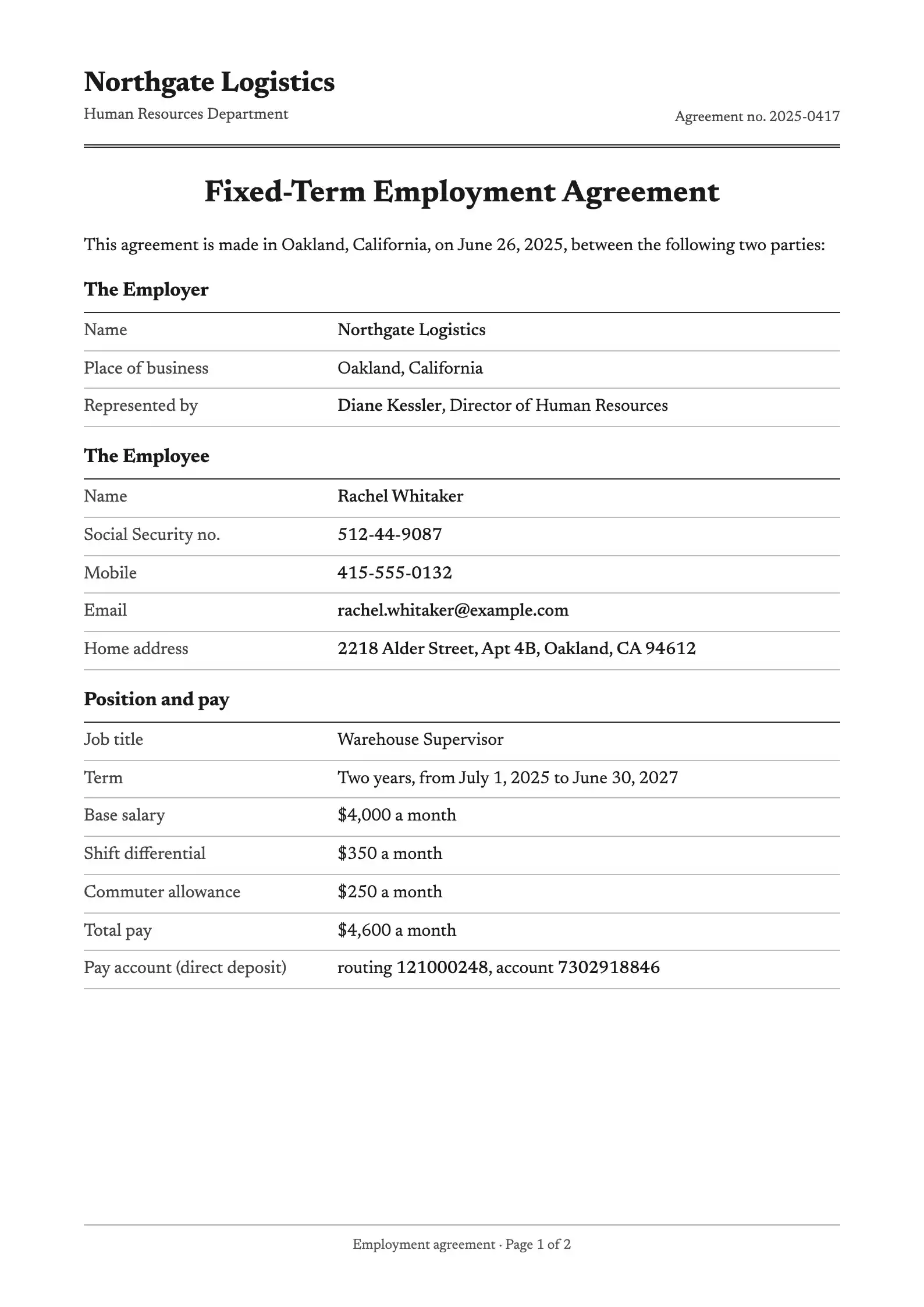

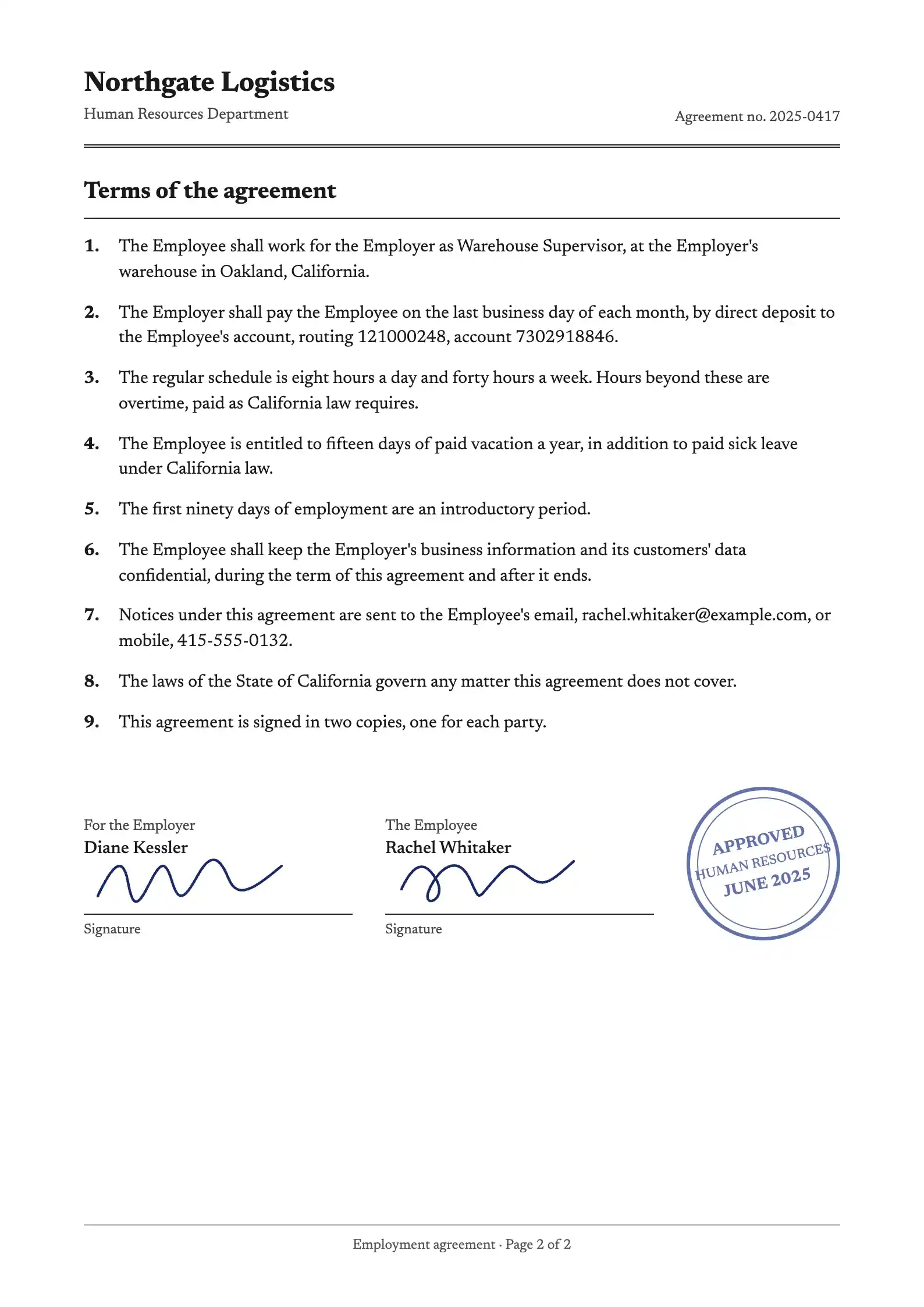

Your AI model provider receives these pages as text with stand-ins, not as a PDF file. They are drawn as pages here so you can compare.
replaced with a stand-inleft as written
The same conversation, as you see it and as your AI model provider receives it
Rachel Whitaker[PERSON_FBJD2] called from 415-555-0132[PHONE_JCQMJ]. Northgate Logistics[ORG_FUGY3] has not paid her for four months. Draft the wage claim from the intake form and the pay stubs in this folder.
Read client-intake.pdf and 4 pay stubs
Done. I wrote wage-claim.docx for Rachel Whitaker[PERSON_FBJD2], Social Security number 512-44-9087[ID_CY52G], against Northgate Logistics[ORG_FUGY3]. It claims $18,400 in unpaid wages for July to October 2026.
Showing what you see on your Mac.
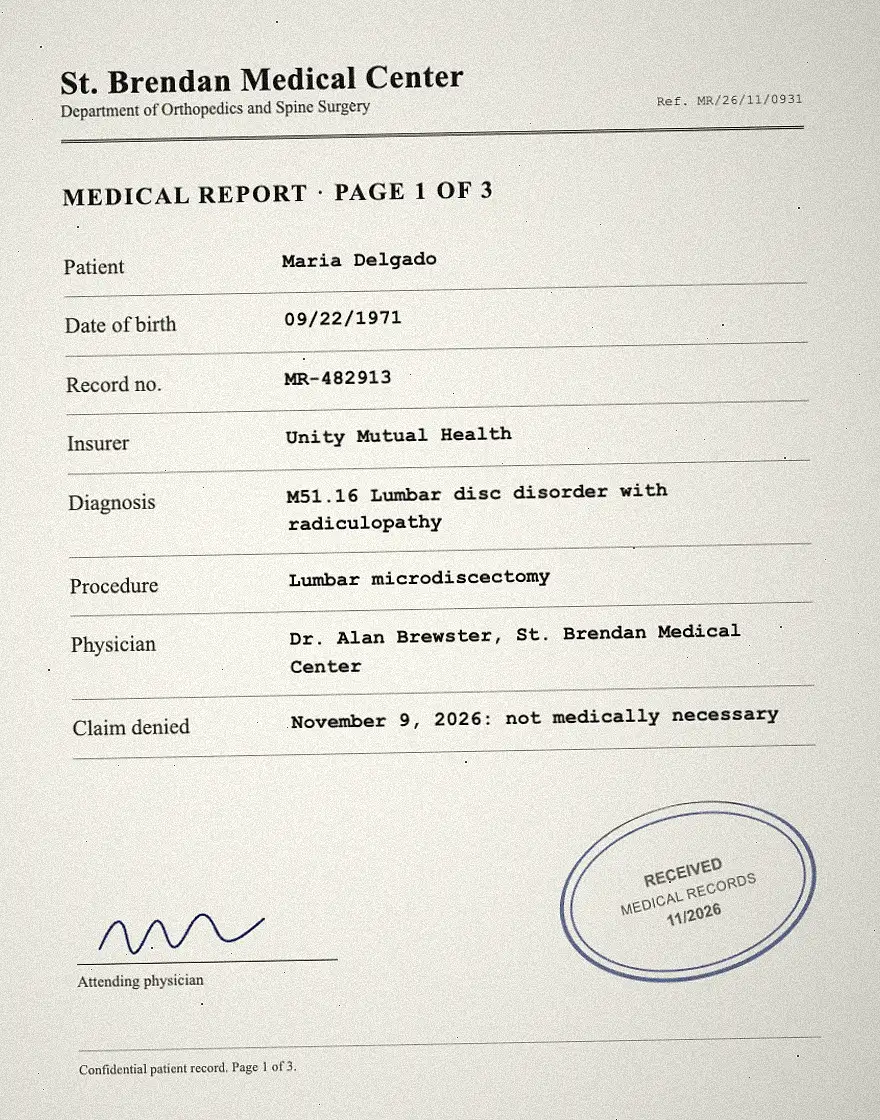
What happens to a scan or a photo of a document
By default your AI model provider receives the text read from it, with stand-ins. If you choose, it receives the image itself, with a labelled box over each name and number.
-
The scan, on your Mac
The agent opens the image file.
-
The text read from the scan
DoeDesk’s detection service reads the scan on DoeDesk’s servers in Jeddah and finds the names and numbers in it.
St. Brendan Medical Center Department of Orthopedics and Spine Surgery
Ref. MR/26/11/0931
MEDICAL REPORT · PAGE 1 OF 3
Patient
Maria Delgado
Date of birth
09/22/1971
Record no.
MR-482913
Insurer
Unity Mutual Health
Diagnosis
M51.16 Lumbar disc disorder with radiculopathy
Procedure
Lumbar microdiscectomy
Physician
Dr. Alan Brewster, St. Brendan Medical Center
Claim denied
November 9, 2026: not medically necessary
-
What your AI model provider receives by default
That text, with stand-ins. No image.
[ORG_MHNZZ] Department of Orthopedics and Spine Surgery
Ref. MR/26/11/0931
MEDICAL REPORT · PAGE 1 OF 3
Patient
[PERSON_E55M6]
Date of birth
09/22/1971
Record no.
MR-482913
[ORG_CA6MA]
[ORG_HHKG4]
Diagnosis
M51.16 Lumbar disc disorder with radiculopathy
Procedure
Lumbar microdiscectomy
Physician
Dr. [PERSON_YL8WQ], [ORG_MHNZZ]
Claim denied
November 9, 2026: not medically necessary
-
What your AI model provider receives with “Redacted image” on
The image, with a black box over each value DoeDesk detected, labelled with its stand-in; and the same stand-ins as text.
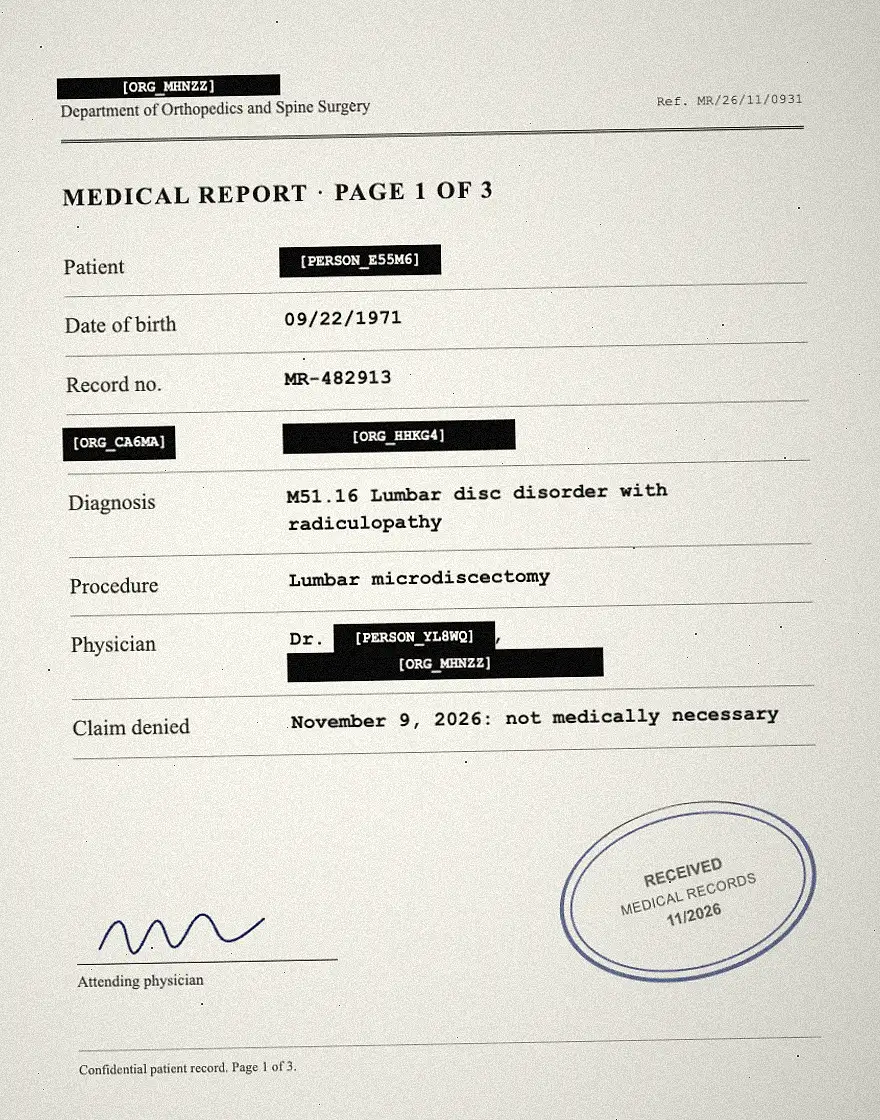
- To be read, the image is sent from your Mac to DoeDesk’s detection service, on DoeDesk’s servers in Jeddah, Saudi Arabia. The service does not store it: it keeps the image in encrypted memory for at most five minutes and never writes it to disk.
- “Redacted image” is a choice in DoeDesk’s Settings, under Privacy; masked text is the default. In the same place you can download, for each image, exactly what was sent: the redacted image and the masked text.
- If an image cannot be redacted safely, DoeDesk sends its masked text instead. If it cannot be read at all, DoeDesk withholds it and tells the AI that a file was withheld.
- A PDF attached to a request is handled the same way.
Examples of tasks, by profession
- Lawyers Pull the change-of-control clauses out of 31 supply agreements. DoeDesk for lawyers
- HR Write the investigation summary and the outcome letter for a grievance. DoeDesk for HR teams
- Banking and compliance Draft a periodic KYC review from the onboarding file and six months of statements. DoeDesk for bank compliance teams
- Accountants and auditors Match October payroll against the bank payment file and list every mismatch. DoeDesk for accountants and auditors
- Customer support Find the three root causes in last month’s complaints and count each one. DoeDesk for support teams
- Healthcare and insurance Write the appeal against a denied claim from a scanned medical report. DoeDesk for medical claims and appeals
What stays on your Mac, what the AI company receives, and what DoeDesk’s detection service receives
Stays on your Mac
The originals, and the only list that turns a stand-in back into a real value
- Your original files
- The vault file that pairs each stand-in with its real value
- The search for email addresses, IBANs and phone numbers written with a country code
- Putting real values back into answers and into the files the agent writes
Goes to the AI company
Anthropic, OpenAI or another, straight from your Mac, under your own subscription and that company’s terms
- Your requests and the text of the files the agent reads, with a stand-in in place of every value DoeDesk detected
- Scans and PDFs as text with stand-ins; or, if you choose “Redacted image”, an image as the picture itself with a labelled box over each name and number DoeDesk detected
- Dates, amounts and job titles, as written. Together they can point to a person
- Any name or number that detection missed, as written
- Nothing, when DoeDesk could not check the request
Goes to DoeDesk’s detection service
Unless you run your own detection service. Then the text and the files go to your server instead
- The text of your requests and files, as written, to find names, organisations and addresses
- Images and PDFs, to read their text
- DoeDesk’s detection service runs on DoeDesk’s servers in Jeddah, Saudi Arabia. It stores neither the text nor the files; a file sent for reading stays in encrypted memory for at most five minutes
- Kept by DoeDesk, on DoeDesk’s servers in Jeddah, Saudi Arabia, with backups in Jeddah and Riyadh: your sign-in phone number or email address; a record per account of how much was checked and read, and when, never the content; usage statistics you can turn off
DoeDesk is open source, and you can run your own detection service
Open-source agent orchestrator for confidential data.
The Mac app is MIT licensed, and its source code is on GitHub. The code that replaces values is one Node package, packages/privacy-gateway, which you can read on its own.
To keep the text of your files off DoeDesk’s detection service, run your own. Any server that answers these two calls works, with the name-detection (NER) and text-reading (OCR) software you choose.
POST /v1/detect
{ "texts": ["Client: Rachel Whitaker"] }
→ { "results": [{ "entities": [
    { "start": 8, "end": 23, "kind": "PERSON" }
  ] }] }

POST /v1/ocr
<image or PDF bytes>
→ { "text": "…" }
AI tools DoeDesk works with
You sign in to each tool with your own subscription. DoeDesk runs the tool and replaces the detected values in what the tool sends.
- ClaudeAnthropic
- CodexOpenAI, with a ChatGPT plan
- Gemini agentsGoogle
- OpenCode
- Pi
Through these tools DoeDesk covers AI models from Anthropic, OpenAI, Google, DeepSeek, Mistral, xAI, Groq and OpenRouter. DoeDesk blocks Cursor’s agent while replacing is on, because DoeDesk cannot rewrite the format Cursor sends.
Anticipated Questions
Is it free?
In the limited beta, it’s fully free! We plan to make this a paid monthly sub. It will also always remain self-hostable and open-source, so you can use your own NER and OCR providers. I won’t pull the rug.
What does masking mean?
Masking means that DoeDesk replaces the names, phone numbers, ID numbers and account numbers it detects with stand-ins such as [PERSON_FBJD2] before Anthropic or OpenAI receives the text of your files, then puts the real ones back on your Mac.
What exactly does the AI company receive?
Anthropic, OpenAI or whichever AI company you signed in to receives your request and the text of the files the agent reads. In place of every name, organisation, address, phone number, email address, ID number and account number that DoeDesk detected, it receives a stand-in such as [PERSON_FBJD2]. It receives dates, amounts and job titles as written, and anything detection missed as written. It receives scans and PDFs as text with stand-ins; if you choose “Redacted image” in Settings, under Privacy, it receives an image as the picture itself, with a black box labelled with its stand-in over each value DoeDesk detected. The text travels from your Mac straight to the AI company, under your own subscription and that company’s terms.
What does DoeDesk’s detection service receive and keep?
It receives the text of your requests and files as written, to find names, organisations and addresses, and the images and PDFs it reads for you. It processes both on DoeDesk’s servers in Jeddah, Saudi Arabia, and stores neither the text nor the files: a file sent for reading stays in encrypted memory for at most five minutes and is never written to disk. The server’s code is public: accelerate-sa/doedesk-server. What DoeDesk keeps, on DoeDesk’s servers in Jeddah, Saudi Arabia, with backups in Jeddah and Riyadh: the phone number or email address you sign in with; a record per account of how much was checked and read (requests, characters, pages) and when, never the content; and usage statistics, which you can turn off in DoeDesk’s Settings, under Privacy. If you run your own detection service, none of your text or files reaches DoeDesk’s.
Can DoeDesk miss a name or a number?
Yes. Detection is automatic and it makes mistakes. A name that DoeDesk’s detection service misses is sent to the AI company as written, unless that name is already in the vault file on your Mac. Details that are not identifiers on their own, such as a job title, a district, a date or an amount, are never replaced, and together they can point to a person. In our tests, three formats were not detected: a UK National Insurance number, a UK sort code and account number, and a medical record number. DoeDesk also sometimes replaces an ordinary word that its detection service takes for a name; DoeDesk puts that word back like any other value. In DoeDesk, Settings, then Privacy, lists every request and how many values were replaced in it: check it when the material matters. If DoeDesk cannot check a request at all, DoeDesk does not send it.
Is it safe to put confidential information into Claude or ChatGPT?
That depends on your plan with Anthropic or OpenAI, on that company’s terms, and on what your employer and your clients allow. DoeDesk changes one thing: what the AI company receives. In place of each name and number DoeDesk detects, the AI company receives a stand-in. DoeDesk does not change what the AI company does with the text it receives, and anything DoeDesk does not detect arrives as written. The list of what goes where shows all of it.
My company blocked or banned ChatGPT. Can I use DoeDesk instead?
Not without asking. DoeDesk is not a way round a block. Show your company’s security or compliance staff the list of what goes where, the source code and the option to run your own detection service, and use DoeDesk on work files once they agree.
Is DoeDesk HIPAA or GDPR compliant?
No software makes you compliant on its own. What DoeDesk does: before the AI company receives your text, DoeDesk replaces the identifiers it detects with stand-ins, and only the vault file on your Mac turns a stand-in back into a real value. Data protection law calls that pseudonymisation, not anonymisation. What DoeDesk does not do: it has no HIPAA business associate agreement with you, and by default it sends your text as written to DoeDesk’s detection service.
What is the difference between masking, redaction and anonymisation?
Redaction and anonymisation remove a name for good. DoeDesk’s masking replaces a name with a stand-in and keeps the pair in the vault file on your Mac, so DoeDesk can put the name back. That is pseudonymisation. For you, the person who holds the vault file, text DoeDesk has masked is still personal data.
How is DoeDesk different from Claude Cowork or an enterprise plan?
Those plans control what Anthropic or OpenAI does with the data it receives from you. DoeDesk changes what Anthropic or OpenAI receives. You can use DoeDesk together with such a plan.
Does Claude or ChatGPT train on what I send?
Your plan and your privacy settings with Anthropic or OpenAI decide that; check that company’s own settings page. DoeDesk replaces detected values with stand-ins whichever plan you have.
Does DoeDesk work with scanned PDFs and images?
Yes. DoeDesk sends the image or PDF to DoeDesk’s detection service, which reads its text on DoeDesk’s servers in Jeddah and finds the names and numbers in it. By default the AI company then receives that text with stand-ins, and no image. If you choose “Redacted image” in DoeDesk’s Settings, under Privacy, the AI company receives the image itself, with a black box over each detected value labelled with its stand-in, and those stand-ins as text. For each image you can download exactly what was sent. An image that cannot be redacted safely goes as masked text; a file that cannot be read is withheld, and DoeDesk tells the AI that a file was withheld.
Does DoeDesk work offline, or with a local AI model?
No. The AI models run at the AI company you subscribe to, and names are found by DoeDesk’s detection service over the internet unless you run your own detection service. DoeDesk is not a local AI model.
Does DoeDesk work on Arabic documents?
Yes. DoeDesk handles Arabic names, Arabic-Indic digits (٠٥٥…) and files that mix Arabic and English, and it gives two spellings of one name, such as أحمد and احمد, the same stand-in.
Can I run my own detection service?
Yes. DoeDesk needs one service that finds names in text and, to read scans, one that reads text from images. Any server that answers POST /v1/detect and POST /v1/ocr works, with the name-detection and text-reading software you choose. Choose “Use my own detection service” when you first open DoeDesk, or later in Settings, under Privacy. DoeDesk then signs out of your DoeDesk account and sends your text only to your server.
Is there a Windows version?
Not yet. Today DoeDesk runs on Macs with Apple silicon.
Who is behind it?
DoeDesk is made by Accelerate, a Saudi company in Jeddah that builds apps and business systems for companies. DoeDesk is a fork of T3 Code by T3 Tools; the agent runtime and most of the interface are theirs. Write to hello@doedesk.com.